Norsk-CTL

One command to run Norsk. Zero compose files, zero proxy config.

Norsk-CTL is the control plane for Norsk Media — a single binary that manages the containers, networking, proxy, and configuration on your machine or your server. Install it once. Get a Studio canvas in your browser in under five minutes, driven by a visual UI, CLI, or REST API.

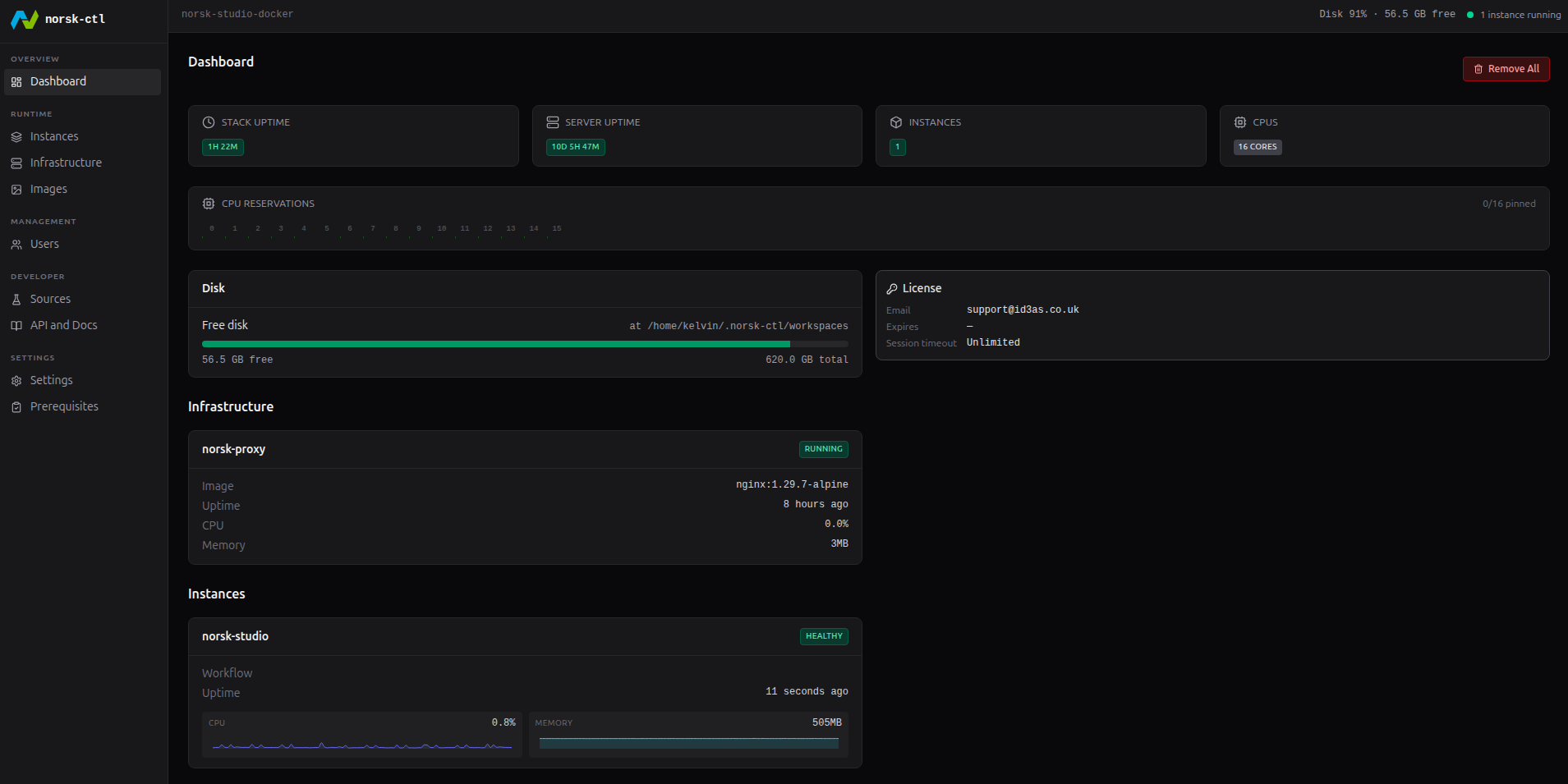
The Norsk-CTL dashboard: stack and server uptime, instance count, CPU reservations, disk usage, licence, and running infrastructure at a glance

How it works

Install. Launch. Build.

Three steps from nothing to a running Norsk pipeline — without touching a compose file or configuring a proxy.

Step 01
Install the binary

One installer, no runtime dependencies beyond a container runtime. Norsk-CTL is a single self-contained binary that runs on macOS via Docker Desktop and Linux natively — locally for development, or on a production server. It manages everything else: the containers, the network, the proxy, the configuration.

Installation guide →
Step 02
Choose your mode and launch

Host mode: simplest, ideal for local development — Studio in your browser in seconds, no proxy to configure. Docker mode: full container isolation and a single external entry point with proxy authentication, the right default for multi-instance production. Hybrid mode: proxy-based UI routing with the media engine running directly on the host for the lowest-latency ingest.

Network modes explained →
Step 03
Build your pipeline

Studio opens in the browser. Build workflows visually, drive them via the auto-generated REST API, or automate with the CLI — the same workflow graph is accessible through all three. The MCP adapter lets AI tools build and manage pipelines programmatically from natural language, using the same interface that drives the CLI.

API reference →

Who uses it

From first evaluation to production operation

Norsk-CTL is the runtime layer for Norsk Media across every stage of the workflow lifecycle.

Developer / Evaluator

Running Norsk for the first time — without a morning of infrastructure setup

An engineer wants to evaluate Norsk Studio. Getting the stack running has historically meant writing compose files, configuring network bridges, setting up a reverse proxy, and diagnosing port conflicts before anything in the browser connects.

Norsk-CTL handles all of it. Host mode gets Studio in a browser in under five minutes — one install, one command. The engineer evaluates the pipeline builder on real protocols without spending a morning on infrastructure that isn't the thing they're trying to test.

Talk to Us →
Solution Architect

Reproducible environments across every client engagement

A solution architect needs to stand up a Norsk Studio environment on a client's server for a POC. Each engagement starts from scratch: containers to configure, networking to sort, proxy to wire up. Setup time before the pipeline work even starts.

One Norsk-CTL install on the client's machine. Docker mode is configured via CLI — scriptable, repeatable, the same on the next engagement. The architect spends the POC on the pipeline, not the runtime. The same configuration that ran on the last client's server runs on this one.

Talk to us about your engagement →
Production Operator

Running Norsk in production with a supported operational posture

An operations team needs Norsk running on a Linux server with TLS, a daemon they can manage as a system service, documented backup and restore procedures, and a clear upgrade path — not a compose file patched together from a getting-started guide.

Norsk-CTL runs as a system daemon on Linux. TLS termination is built in. Backup and upgrade procedures are documented and designed to be scripted. The team has a production deployment with a defined operational posture, not informal tribal knowledge.

Server deployment docs →

Capabilities

The runtime layer Norsk was missing.

Norsk-CTL manages what you shouldn't have to manage — so Studio is what you actually interact with.

Binary
Single binary, zero runtime dependencies

A self-contained executable with no external dependencies beyond a container runtime. Install it, run it. No package managers, no dependency graphs, no version conflicts. macOS via Docker Desktop; Linux natively. The binary handles the containers, networking, and proxy from there.

Interfaces
UI, CLI, and REST API — one consistent surface

Every operation available in the web UI is also available in the CLI and REST API. Explore interactively, automate with the API, script with the CLI — the same workflow graph is accessible through all three. No capabilities reserved for one interface over another.

Networking
Three network modes for every deployment scenario

Host mode for local development: simplest, no proxy overhead, running in seconds. Docker mode for production: full container isolation, single external entry point, proxy authentication, multi-instance support. Hybrid mode for performance-sensitive deployments: proxy-based routing with the media engine on the host network for lowest-latency ingest.

Orchestration
Container and network management out of the box

Norsk-CTL manages the Docker containers, the bridge network, the reverse proxy, and the configuration — so you don't have to write compose files or wire up a proxy by hand. Multiple instances can run simultaneously without port conflicts on internal container ports.

Security
TLS termination built in

TLS is handled at the proxy layer, not bolted on after. The admin API port is localhost-only by design. Documented security posture for production deployments, including what is and isn't exposed and why. The right defaults out of the box; the right controls when you need to change them.

Automation
MCP adapter for AI-driven pipeline management

The MCP adapter exposes Norsk-CTL operations to AI tools via the Model Context Protocol — so language models can build, query, and manage Norsk pipelines from natural language instructions. The same interface that drives the CLI drives the AI.
The fastest path to a running Norsk pipeline.

Install Norsk-CTL, launch an instance in Host mode, and get Studio in your browser in under five minutes. A Norsk licence is required — get in touch to get started.

Talk to Us